

 OFFERS
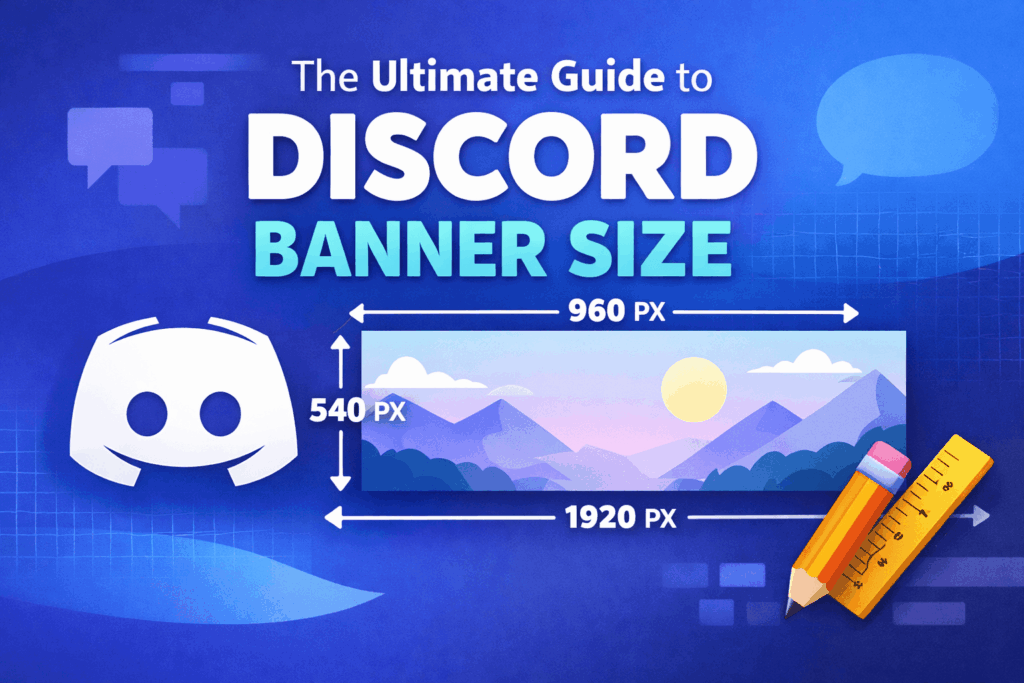
Discord has become the top choice for communities and gamers as well as creators and brands. The appearance of your profile and community space depends on how well you customize your settings when you use Discord for both friend chats and large server management. The best method to create a unique identity for yourself is through a professionally crafted banner design.
The majority of users face difficulties when they try to identify the appropriate Discord banner size. The wrong size causes users to experience problems with their images because they appear blurry and misaligned while some parts of their designs become hidden from view. Your banner will maintain its professional appearance when you use the correct dimensions because all devices will display it with perfect clarity and sharpness.
The full guide provides complete information about Discord banner sizes, including all dimensions and design strategies and the most common errors people make when designing their banners.
What Is a Discord Banner?
A Discord banner is a visual element that appears at the top of your profile or server. Users can use this feature to customize their accounts, which leads to more attractive profiles.
Discord offers two major types of banners for users to choose from:
- Profile Banner – visible on your personal profile
- Server Banner – displayed on Discord servers
Both types serve the same purpose: to create a unique and engaging visual identity. A banner that effectively showcases your personality will create a powerful impact on your community.
Discord Profile Banner Size
The recommended Discord banner size for profile banners is:
600 x 240 pixels
This size ensures that your banner fits perfectly within Discord’s layout without distortion or cropping.
Key details: The aspect ratio of the image is 5 to 2. The system accepts three file types, which include PNG and JPG plus GIF, but users need Discord Nitro to access GIF support. Keep file size within Discord limits.
Discord will automatically resize your image when it exceeds or falls below the minimum required size. The process leads to image quality reduction while essential design components get eliminated from the final product.
Discord Server Banner Size
Discord server banners require a recommended banner size of
960 x 540 pixels
This larger format is ideal for servers that have reached the required boost level to unlock banner features.
The image has an aspect ratio of 16:9. The platform provides optimal support for displaying high-resolution images. The platform serves as an effective tool for establishing brand recognition and developing community connections.
Server banners use correct dimensions to ensure that communities reach their goal of maintaining a polished and professional appearance.
Why Discord Banner Size Is Important
The majority of users fail to understand that using the correct Discord banner size holds greater importance than they think. The method you use to display your banner directly affects how others will see it.
The proper size enables your image to maintain clear visibility without creating pixelated effects. A low-quality or stretched image can make your profile look unprofessional.
The first benefit of using proper dimensions is that it protects your content from being removed from the design display. The improper banner size will lead to loss of essential content, which includes both text and logos.
A well-sized banner enhances the user experience because it improves the overall performance of the system. Your profile or server will become more attractive when you create a design that combines visual appeal with neatness.
Tips for Designing a High-Quality Banner
The process of creating an outstanding banner requires both size specifications and design elements. Here are some practical tips to help you create a visually appealing banner.
Keep Your Design Simple
Add only essential design elements to your banner design. The choice of a simple design makes it possible for viewers to comprehend better while maintaining a professional appearance. Focus on one main idea or theme.
Use High-Resolution Images.
Always use high-quality images to avoid blurriness. Low-resolution images create poor visual results even when you select the correct Discord banner size.
Center Important Content.
Your banner should have all important elements, including text and logos and icons placed in its central area. This ensures they remain visible even if slight cropping occurs on different devices.
Choose Colors Wisely
Select colors that match your server theme and profile design. The use of consistent color schemes will help you create a visual identity, which will make your banner more recognizable.
Best Tools to Create Discord Banners
You don’t need to be a professional designer to create an impressive banner. The system provides several tools that enable users to create banners without needing design expertise.
Some popular tools include:
These platforms provide users with pre-designed templates that enable them to create banners through their drag-and-drop feature while they have the freedom to personalize their design.
Common Mistakes to Avoid
The process of creating Discord banners leads many users to make basic mistakes. The final output improvement requires users to avoid these items.
One common mistake is using the wrong dimensions. If you don’t follow the recommended Discord banner size, your image may appear stretched or cropped.
The other mistake involves placing important text near the edges of the content area. This can cause it to be cut off on certain screens.
Most people encounter problems when they select low-quality images. Always choose clear and sharp visuals to maintain a professional look.
The effectiveness of your banner decreases when you add excessive design elements. Designs that use a clean and simple approach tend to perform better.
How to Upload a Discord Banner
You only need to complete a few simple steps to upload your banner after it has finished its preparation process.
For profile banners:
- Go to user settings.
- Click on “Profile.”
- Upload your banner image.
For server banners:
- Open Server Settings
- Navigate to Overview
- Upload your server banner.
You need to make sure that your image follows the required dimensions because any deviation will create display problems.
Final Thoughts
Understanding the correct Discord banner size is essential for creating a visually appealing profile or server. The right dimensions will make your banner display have perfect sharpness and proper alignment and a professional appearance.
A well-designed banner creates a strong first impression when you design your profile or build a community space. Your banner will achieve optimal visibility when you follow recommended sizes, which require high-quality images and simple design elements.
The process of designing the perfect Discord banner becomes simple when you have the appropriate tools and methods available to you.