


 OFFERS
Instagram Stories is one of the best features for sharing moments, short updates, and memories. After 24 hours, a story disappears, and Instagram automatically saves it to the archive if the feature has been enabled. Users will likely later retrieve those archived stories either to repost or highlight them. If you want to know how to unarchive a story on Instagram, this guide walks you through everything you need to know.
What Is Instagram Story Archive?
Instagram’s Story Archive is a private space where your stories are automatically stored when they expire. They will only be visible to you and can be accessed at any point in time from your profile. The archive lets you revisit past stories, reuse previous content, and create highlights without having to upload everything again. This is where the feature comes in handy in keeping significant memories or content that you might want to share later.
How to Access Your Archived Stories
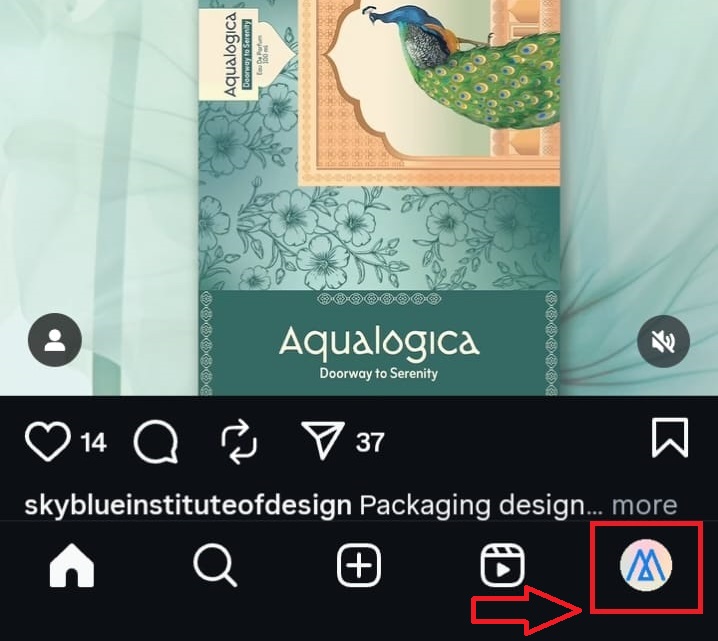
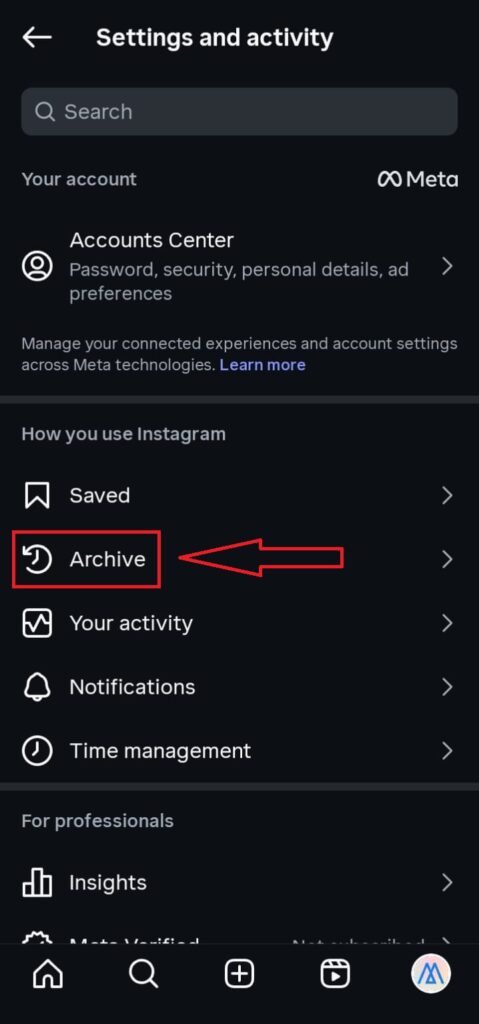
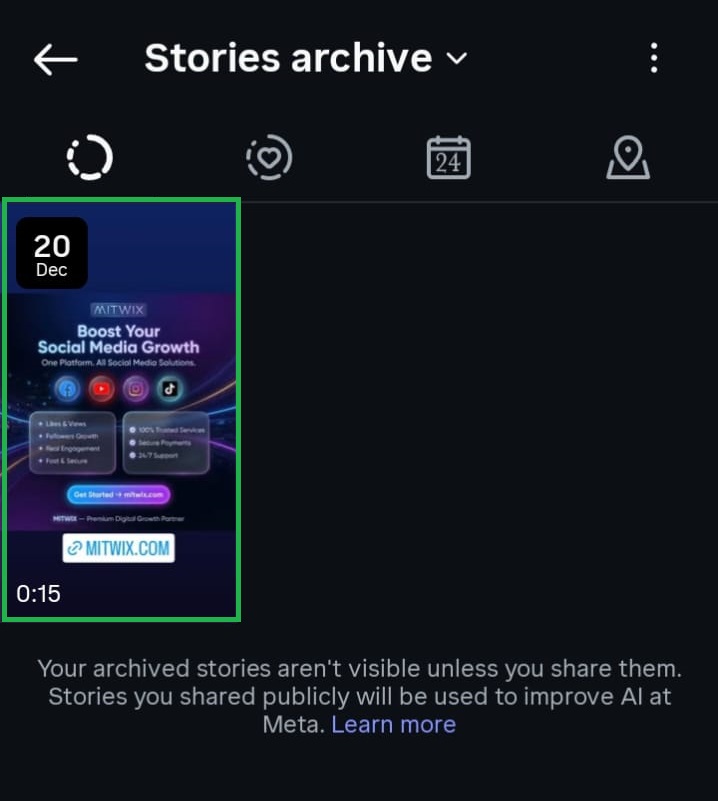
To begin unarchiving a story, you must first access the story archive. Open Instagram and go to your profile. Tap the three-line menu in the top-right corner and select “Archive.” Instagram usually defaults to showing your Story Archive, but in the dropdown at the top, there is a switch to switch between story, post, and live archive. Once you enter the Story Archive, you will see every single one of your previous stories categorized by date.

How to Unarchive a Story on Instagram
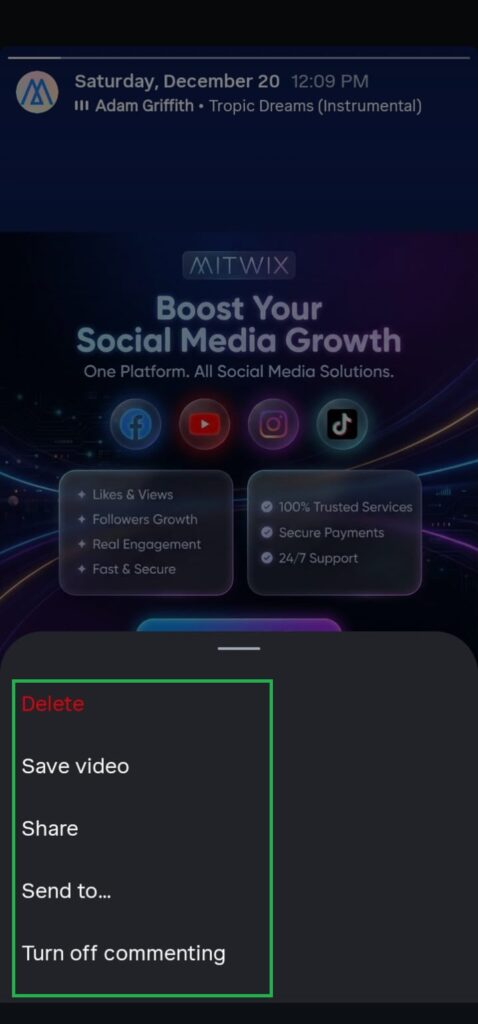
Unarchiving a story means making it visible again. Instagram does not let you restore a story to its original state; you can reshare it differently. Tap to select the relevant archived story, tap the three-dots menu, and choose your preferred option: repost it as a new story, add it to a highlight, or share it as a regular post (if applicable). With every option, your story gets a fresh opportunity for more visibility.
Reposting an Archived Story as a New Story
Reposting is one of the most used unarchive options for any story. Select the archived story, tap “Share” or “Add to Story,” and it will be reposted as a new story. Then, it will stay visible for another 24 hours. You can also add stickers, text, music, and effects before sharing. That’s perfect if you want to call attention back to an old moment or promotion.
Adding an Archived Story to Highlights
The other most widely viewed option adds your archived story to Instagram Highlights. These are permanently displayed on your profile, right below your bio, so it’s a good idea to keep important content there. Open the archived story, tap on “Highlight,” and choose to put the story in an existing highlight or create a new highlight. This means your story would be visible perpetually without reposting it on your main story feed.
Sharing an Archived Story as a Post
Usually, most stories could be shared as an ordinary feed post, but this option will depend on whether the story content is suitable in a square or portrait format. If available, pick “Share as Post” within story options. The caption can be edited, people can be tagged, and hashtags can be chosen just like any other post. This is a fine way of repurposing strong story content, adding a long-term visibility option.
Why You Might Not See an Unarchive Option
Sometimes one might not find this unarchiving and sharing option within the story. This occurs because a story might have been created with features that are no longer supported, or because archive settings were disabled when the story expired. Make sure to turn on the option for story archiving by going to Settings, then clicking Privacy, and enabling “Save story to archive” to avoid a similar situation in the future. Doing so assures you that your stories are always saved and forever.
Tips for Managing Archived Stories Effectively
Archive management would save significant time and enhance content strategies. Go through your archive regularly to find some content worth resharing or adding to highlights. Organize highlights by themes, such as travel, work, or promotions, so you can keep your profile clean and engaging. Unlike public highlights, where inactive stories form a valuable content library for businesses and creators who want to reuse the best content, archived stories are not viewable.
Final Thoughts
You know, the only proper place to go to unbury a story on Instagram. But while it isn’t quite saved in its original form, Instagram gives you some freedom to repost, add to highlights, or share as a post. These avenues allow the reuse of old content while keeping your profile fresh. It becomes apparent from any understanding of the functionality of story archives made for the individual that the potential of each story shared can be made the best out of.
Frequently Asked Questions
Can I unarchive a story on Instagram?
Yes. If you know that an archived story on Instagram is not going to come back in its original grandeur, you can unarchive it. What it means is that the story after restoration can be reposted as a new story, added to the highlight, or shared as a post. And through these practical methods, old content visibility can be achieved.
Will an unarchived story keep its original views and reactions?
No, it doesn’t because unarchiving and reposting are seen as fresh stories. The archiving process does not restore various attribute counts into views, reactions, and engagements but will begin anew for visibility and operations.
How long are Instagram stories kept in the archive?
Archived stories will be available indefinitely in Instagram archives unless the archive feature is disabled. You can go back in time and reclaim all past stories, except for deleting them with your own hand.
Will other people view archived stories?
These are completely private archived stories. You will be the only one who can view them, without republishing the story or adding to a public highlight on your profile.
What are the reasons behind missing stories in the archive?
If a story is not found in archives, that means the archive feature must not have been enabled when that story expired or that story was deleted manually. Always check out the settings to see if the “Save story to archive” option is turned on.
Can I edit a story when unarchiving it?
Yes. When reposting on Instagram, the archived story could also be modified with new stickers, music, texts, and effects. Thus, providing an easy route to refurbish old content and make it suitable for new audiences.
Can I, through a desktop, unarchive my stories?
At present, it does not allow the unharvesting of stories via the desktop. The mobile app is the only way to access and manage the story archive on iOS or Android.
Can I delete stories from an archive forever?
Yes, any archived story is capable of being deleted at any time. Once deleted, retrieving the story is not possible, and that necessitates care before getting rid of archived content.