


 OFFERS
Millions watch movie after movie of Instagram flower post layouts, pictures, and videos. But what do you do with that picture that is mood-board perfection or a cute little video to watch on the go? The app doesn’t have a direct download button for the unfortunate post, and the search begins with the help of “How to download Instagram posts”
Such gaps in users’ demand for quick fixes make many turn blind to legal ramifications. Downloading content from public profiles can be legal with certain constraints, whereby doing it the legal way is what counts. This guide examines how to go from official ways to get your stuff to trustworthy tools for public posting. You will explore methods in-depth and discover ethical pitfalls, all while learning to surf the internet with safety. In no time, you will be hitting Instagram saves with major professional skills while keeping it legal.
Is It Legal to Download Instagram Posts Content?
Instagram has laid down rules for its platform to protect the creators. Before any downloads are attempted, it is important for the user to know what the platform allows. This knowledge keeps them out of trouble and upholds the platform’s community.
Instagram’s Terms of Service on Content-Downloading
This means that by their rules, you are not allowed to copy other people’s posts or create a download for them without their consent. They are very specific in their terms about what is on their “to-do” list, which includes refraining from downloading media coming from private or public accounts. If caught, the owner may complain about such an act, leading to suspension of your Instagram account or, in the least severe situation, legal action against you.
The policy’s aim is to protect a user against privacy violation and creativity theft. For instance, you have no claim on the ownership of any of the posts tagged public; it belongs to the uploader. All policies are changing quite frequently, so we would advise you to keep checking the app’s help center.
This is like borrowing a book from the library. You can review it, but taking it home with you requires the owner’s thumb of approval.
The Difference Between Saving and Downloading (In-App Features)
By using the save feature of Instagram, you can collect posts in a private collection within the app. This is convenient for the fast reference of your purpose, but it is not one that gives you a real file on your phone or computer the thumbnail view, not the actual full-resolution image.
Downloading means pulling the raw photo or video to your device. This allows or enables editing, sharing offline, or backing up. The app blocks others’ content from downloading to ensure protection from misuse, which is what forces you to seek workarounds.
Why does this really matter? Saving keeps everything within Instagram’s ecosystem, while downloading opens doors to external use. Pick what suits your needs; just do not use downloads for anything other than your own posts.
Copyright Law and Fair Use in Social Media Contexts
Content on Instagram belongs to the people who posted it. Copyright law protects their work from unauthorized use. You own anything you have uploaded on Instagram; therefore, feel free to download your own stuff.
Fair use is an exception that allows limited copying for things like education or commentary, but clarifying its tricky terrain within social media is worth the time. Downloading a meme for your own enjoyment may be fair use, but reposting it for your friends without credit is not. If in doubt, asking would be wise.
DMCA laws in the USA, however, regulate these laws. Creators make takedown notices for stolen content. Respect this to evade serious fines or drama.
Official and Built-In Methods to Archive Your Own Content
The easiest and most secure method to download Instagram post media is saving content from your own profile. No third-party risks here. These methods work best for personal backups or revisiting old memories.
Downloading Your Entire Instagram Archive
- Head to your profile and tap the three lines in the top right. Select “Your activity,” then “Download your information.” Enter your email and hit request download.
- Instagram compiles everything photos, videos, messages, and more into a zip file. It might take 48 hours or longer during busy times. Once ready, you’ll get an email with a link to grab it.
- This bulk option beats downloading one by one. Use it monthly to keep records safe, especially if you worry about account hacks.
Saving Stories Before They Expire
Stories vanish after 24 hours, so act fast on your own. Open the story in your highlights or archive. Tap the three dots and choose “Save” to store it in your camera roll.
For active stories, use the app’s built-in tool right from the viewer. It exports as a video clip. If archived, access them via settings under “Archive.”
This keeps fleeting content forever. Share later or edit into compilations without hassle.
Capturing Your Own Posts via the Web Interface
Log into Instagram on a desktop browser. Find your post and right-click the image or video. Select “Save image as” or “Save video as” from the menu.
For stubborn formats, use the browser’s inspect tool. Right-click, choose “Inspect,” and search for the media URL in the network tab. Copy and paste it into a new tab to download.
This method shines for high-quality grabs. It’s quick for single posts and avoids mobile limits. Test it on a recent upload to see the crisp results.
Best Third-Party Tools to Download Instagram Posts Safely
Public posts from open accounts are fair game with the right tools. Stick to reputable options to avoid scams. These methods only work for visible content—no peeking at privates.
Using Online Instagram Downloader Websites

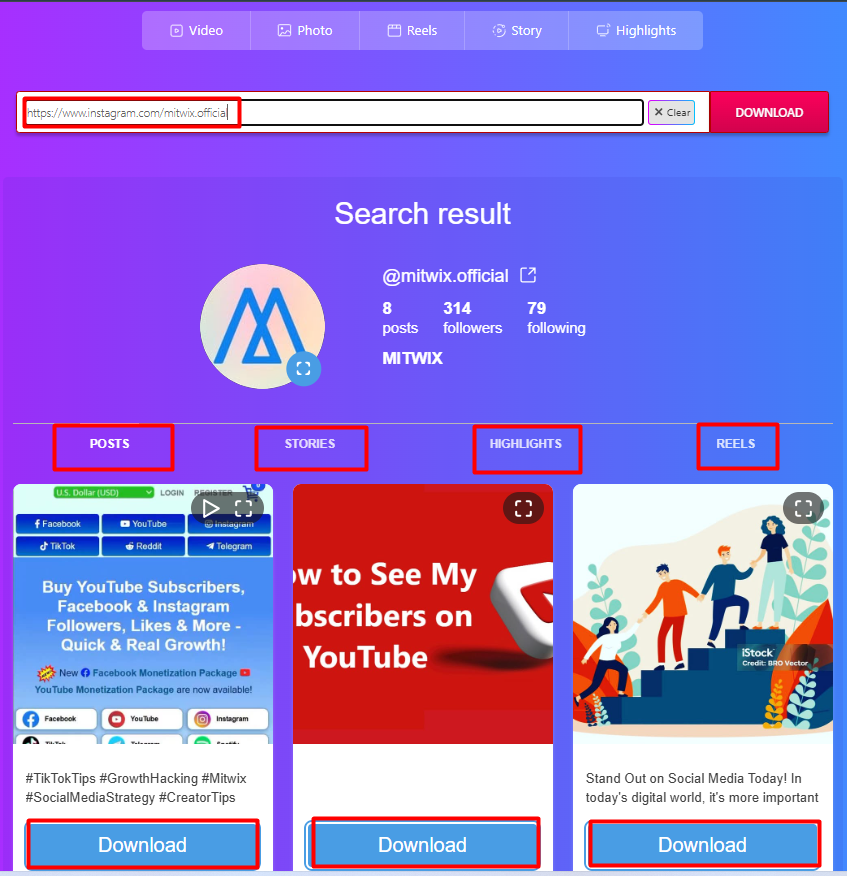
Spot a public post you love? Copy its URL from the share button. Paste it into a trusted downloader site like those focused on Instagram media. The site fetches the photo or video, often in original quality. For videos, pick resolutions from HD to standard. Hit download, and it saves to your device in seconds. Vet sites by reading reviews and avoiding pop-up-heavy ones. Look for HTTPS security and no login requests. Free tools abound, but test with a harmless post first.
- Check user ratings on sites like Trustpilot.
- Scan for malware with your browser’s tools.
- Prefer mobile-friendly pages for on-the-go use.
Using Online Instagram Downloader Websites
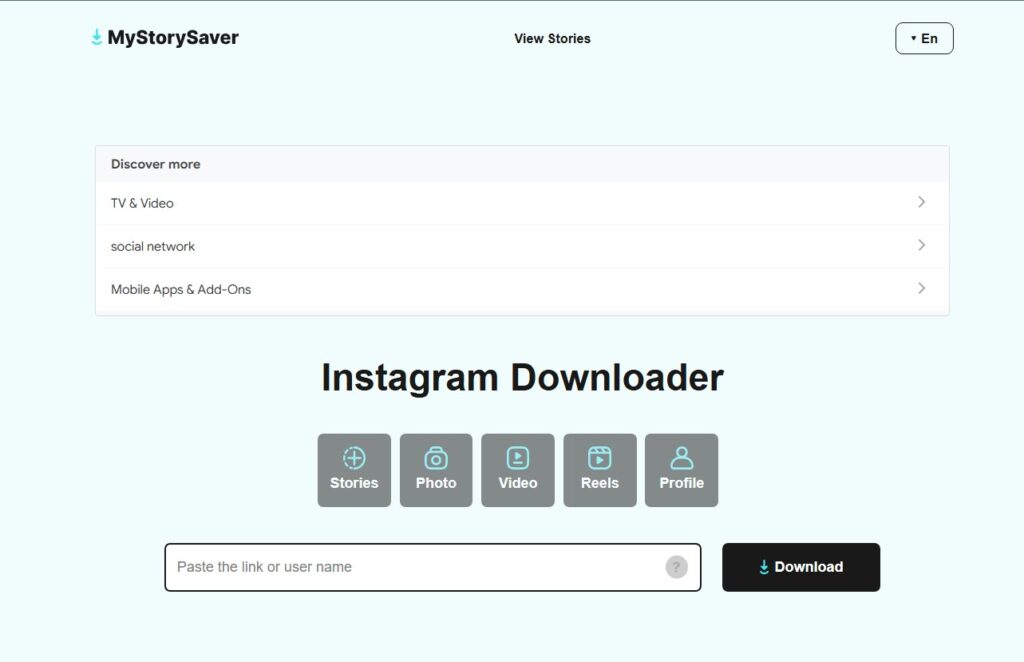
Spot a public post you love? Copy its URL from the share button and paste it into a trusted online downloader. Tools such as MyStorySaver can help users save publicly available Instagram content without installing extra software or sharing their Instagram login details.
For videos, choose the available quality option, such as HD or standard resolution, then download the file to your device. Always avoid websites that ask for your Instagram password, show aggressive pop-ups, or redirect you to suspicious pages.
Specialized Mobile Applications (iOS and Android)
Apps make downloading seamless on phones. Search app stores for “Instagram saver” or similar. Install one with high ratings and recent updates. Open the app, paste the post URL, and select download. Many handle batches, pulling multiple images from a profile. Videos are saved with sound intact. For iOS, some use share extensions for one-tap saves. Android options often integrate with gallery apps. Always grant minimal permissions to protect privacy.
Popular categories include video-specific downloaders. They convert Reels to MP4 files effortlessly. Update apps regularly to match Instagram’s changes.
Utilizing Browser Extensions for Bulk Saving
Extensions turn your browser into a download powerhouse. Install one from the Chrome Web Store labeled for social media saves. Activate it on Instagram’s site. Scroll a profile page, and the extension highlights downloadable items. Click to grab images or videos in bulk. It organizes them into folders for easy sorting. This beats manual clicks for influencers with tons of content. Works on Firefox too. Disable when not needed to save browser speed.
Advanced Techniques for Saving Private or Specific Media Types
Some content needs extra steps. Reels and special formats can trip up basic tools. Here’s how to tackle them smartly, always with ethics in mind.
Downloading Instagram Reels and IGTV Videos
Reels stream like short films, so image downloaders flop. Use video-focused sites or apps that support MP4 extraction. Paste the Reel URL, and it converts the stream to a file. Standard tools fail because Instagram encrypts streams. Developer tools in browsers reveal the direct link—inspect the network tab during playback. Download the highest bitrate for sharp quality. Why bother with top resolution? Low-quality saves look pixelated later. Practice on public Reels to master the process.
Downloading Private Account Content (Ethical and Legal Boundaries)
Private posts stay hidden for a reason. Third-party apps can’t access them without login, which breaks rules and risks bans. Get the owner’s permission first—ask via DM. If they share directly, save the file they send. Never use hacks or fake accounts; they’re invasive and illegal. Respect boundaries to build trust online.
Critical Considerations: Ethics, Copyright, and Best Practices
Tools are tempting, but responsibility matters. Downloading sparks questions about right and wrong. Let’s break it down to keep your habits clean.
Obtaining Creator Permission Before Reposting
A download doesn’t grant reuse rights. Message the creator: “Love your post! Can I save and share it with credit?” Many say yes if flattered. Permission covers reposts on other platforms. Without it, you risk takedowns. Build goodwill by supporting artists you admire. This simple step fosters community. Creators thrive on shares, but only with their nod.
Proper Attribution and Watermarking Standards
Credit keeps it honest. Tag the original @username and add “Repost from [link].” Watermarks preserve proof of source if editing. Tools like Canva help add text overlays. For videos, include a note in the description. This honors the work and avoids plagiarism claims. Good attribution boosts your cred too. Followers appreciate transparent sharing.
Risks Associated with Unofficial Downloaders
Shady sites steal data or infect devices with malware. Pop-ups might lead to phishing traps. Always use VPNs on public Wi-Fi. Check for red flags like forced sign-ups or weird redirects. Stick to top-rated options with clean histories. Back up your phone before trying new apps. Security First protects your Instagram account. One bad click can lock you out.
Conclusion: Mastering Instagram Content Acquisition Responsibly
You’ve got the tools to download Instagram posts legally now. For your own content, use built-in archives and web tricks they’re safe and simple. Public posts? Rely on vetted third-party sites and apps, but only for what’s openly shared. Ethics seal the deal. Seek permission, give credit, and dodge risky downloads. This way, you enjoy content without harming creators. Ready to save that next gem? Start with official methods today. Responsible downloading enhances your feed, not exploits it. Stay legal, stay kind.