

 OFFERS
Instagram is among the top social media, and, personally or professionally, it can be very convenient to track one’s followers. However, when someone unfollows you, it can affect your engagement rate, insights, and overall social presence. Unfortunately, Instagram does not notify you directly when someone unfollows you. Luckily, there are simple methods and tools available to quickly and accurately identify who unfollowed you on Instagram. This guide explains how to check for unfollowers manually, via Instagram Insights, or with trusted third-party apps.
Check Manually Through Your Following List
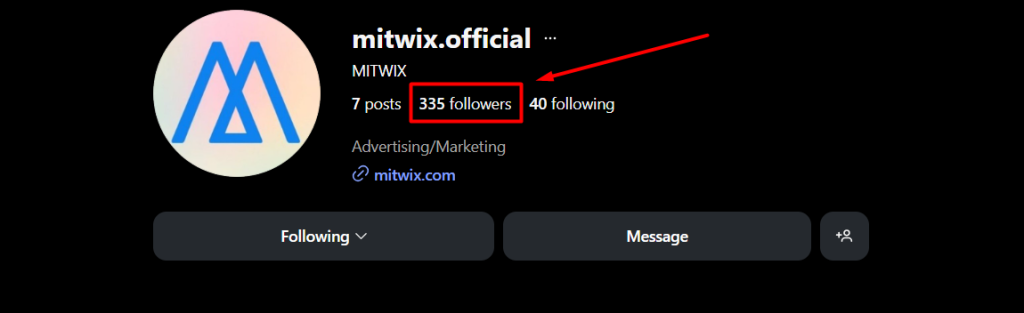
The easiest, but not very effective, way to check an account is to view it manually. If you have a smaller account, it is very effective at preventing people from unfollowing: their names will not appear in your followers list. You can visit their profile and see whether the “Follows You” label is missing. This action is relatively good, but one loses direction when he has hundreds or thousands of followers. Manually checking is time-consuming but does not require tools or apps; use your Instagram account.
Using Instagram Insights (For Business & Creator Accounts)
Instagram Insights is available to both creator and business accounts. Section insights provide detailed analytics on followers. It will not tell the specific names of people who unfollow, but the “follower decrease” is shown in daily measurement. This helps you know when most people drop you after a few posts, stories, or periods of inactivity. Switching to a professional account takes only a minute and helps one get a more thorough picture of what is happening with follower growth. You will not see any names, but with Insights you can analyze unfollow patterns.
Track Unfollowers Using Third-Party Apps
The best way to know who unfollowed him on Instagram is to use trusted third-party apps. It also tracks your follower list in real time and notifies you when a user unfollows your account. Famous apps for this include Followers Tracker Pro, FollowMeter, and Reports+. They compare any changes to your follower list and report who left your list, who did not follow back, and ghost followers. Always choose apps with good reviews and strong security when connecting to the Instagram account. This is the fastest, most accurate method, best for users with significant followings.
Check “Not Following You Back” Profiles
Another way is reviewing your “following” list. If you follow someone but they don’t follow back, they may have recently unfollowed you. Most third-party applications also enable this feature. If you want to check manually, go to your following list and compare it with your followers. It’s time-consuming, but it’ll show how many users are no longer connected to your account.
Keep a Regular Follower Backup
If you want to be fully in control of your followers every time, take screenshots or export your follower list periodically. This is a professional influencer and brand thing that requires detailed tracking of who unfollowed, as lists can be compared over time. It’s not automatic but will definitely ensure 100% accuracy without the need for apps. Backing up regularly won’t hurt either this helps in tracking trends over the long haul for followers.
Why People Unfollow on Instagram
Of course, keeping track of who unfollows is good but knowing the why is more important. Some reasons that usually lead to unfollows include posting too much or too little, a shift in content, problems caused by controversial topics and inactive accounts that Instagram wipes. By recognizing patterns, you’ll be able to refine your content strategy further and bolster engagement.
Final Thoughts
It is now relatively easy to find the one who has unfollowed you on Instagram. No matter if you are checking manually or using Insights or going for follower tracking apps by either means, you will know how the audience behaves. One can understand unfollows in moderation, in line with maintaining good engagement and efficient account growth. With the right tools and continuous monitoring, you can refine your content strategy and build a more loyal community on Instagram.
Frequently Asked Questions
Do You Get Notified When Someone Unfollows You?
Instagram sends no alerts or notifications upon being unfollowed. In this context, many people rely on either manual checking or third-party tracking applications. Hence, this is a secret kept by the platform, and unless you want to look for an alternative method to see who has stopped following your account, no notification will be sent at all.
Is It Safe to Use Unfollower Tracking Apps?
Generally, it is safe to use those applications that have received good reviews, though be cautious in avoiding any that may seem shady or unnecessarily require permissions. A trustworthy application will only access your follower data and will not harm your account. Manual checking is usually the safest option, but it can become tedious for larger accounts, making trustworthy apps a handy alternative.
Can I See Unfollowers Without Using Any App?
Yes, but it will take a lot of time. Assuming you are keeping track of these things, you would have to look at your followers once and then compare the list with what it was yesterday, last week, or even a month or three ago. Manual detection of such changes is near impossible for those with hundreds or even a thousand followers; hence, many prefer tracking tools that balance accuracy and convenience.
Does a Professional or Creator Account Show Unfollowers?
Instagram Insights for Business and Creator accounts only indicate general follower gain or loss figures. There is no telling which users unfollow you. While these insights may help you get an idea of trends, they are not able to actually point out individuals who have unfollowed you; therefore, you have to find other methods if you desire specific names.
Can Someone Hide That They Unfollowed Me?
Anyone who unfollows you will have a “Follows You” mark removed from their profile, and this act can never be hidden. The analytic apps also detect this within no time. They may have privacy settings activated; however, the act of unfollowing will always be visible, one way or another, through various checks, whether manual or auto.
How Often Should I Check for Unfollowers?
How often you check for unfollowers depends on your aim. Influencers, creators, or business accounts could check in weekly to monitor engagement and retention. Casual users check for more sporadically.