


 OFFERS

In a world full of social media noise, you might want to peek at Instagram without leaving a trace. Many folks hit a wall when they try to browse profiles or posts Instagram demands a login every time. This guide shows you safe ways to view public Instagram content without an account, keeping your privacy intact.
People often seek these tricks for quick research, checking out competitors, or just staying low-key. Whether you’re curious about a friend’s updates or scouting trends, anonymous browsing lets you do it without signing up. We’ll cover legit methods to bypass the login screen and explore public feeds hassle-free.
Understanding Instagram’s Visibility Settings and Limitations

Public vs. Private Accounts: The Access Divide
Public accounts on Instagram let anyone see posts, reels, and stories if they’re shared openly. You can view these without logging in through certain tools, but private profiles lock everything behind a follow request. Tagged photos in public posts might show up too, giving glimpses into otherwise hidden worlds.
Instagram sets these rules to protect users, yet it blocks direct access for non-members. Workarounds exist only for public stuff private content stays off-limits unless you know the owner. This divide keeps casual viewers at arm’s length while encouraging sign-ups.
Think of it like a public park versus a gated yard. The park welcomes all, but the yard needs an invite. Stick to public spots for your anonymous views.
Why Instagram Requires Sign up for full access.
Instagram pushes logins to gather user data and serve better ads. Every profile visit feeds their algorithm with info on what you like. This model funds the free app, so they make browsing tough without joining.
Without an account, you miss features like saving posts or direct interactions. The company updates its walls often to close loopholes. Understanding this helps you pick methods that dodge the barriers smartly.
Data shows over 1 billion users log in monthly, driving ad revenue to billions. For you, it means workarounds focus on public scraps they can’t fully hide.
Method 1: Utilizing Third-Party Anonymous Viewers (Web-Based Tools)
Identifying Reliable Anonymous Instagram Websites
Go to https://www.boostfluence.com/free-tools/instagram-profile-viewer

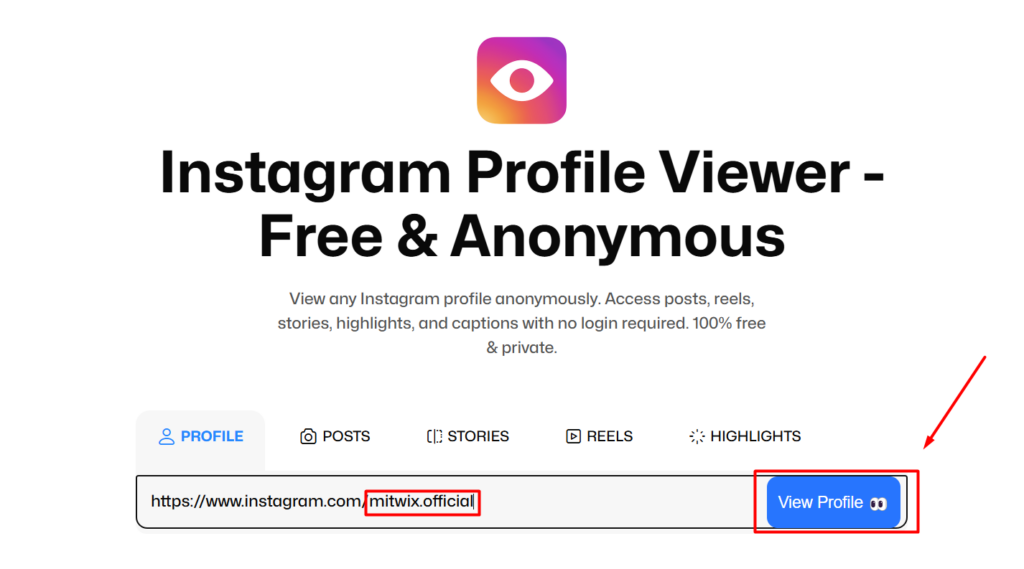
Look for web tools that promise no-download viewers for public profiles. Sites like these pull data without needing your login details. Pick ones with good reviews and HTTPS security to avoid scams.
Steer clear of apps asking for personal info they could steal data. Trusted options update often to match Instagram’s changes. Always test with a small search first.
Reliable tools show posts, bios, and follower counts for public users. They work best on desktops for clear views.
Security Alert: Shady sites might track your IP or push malware. Use a VPN and avoid entering any emails. Check user forums for recent feedback before diving in.
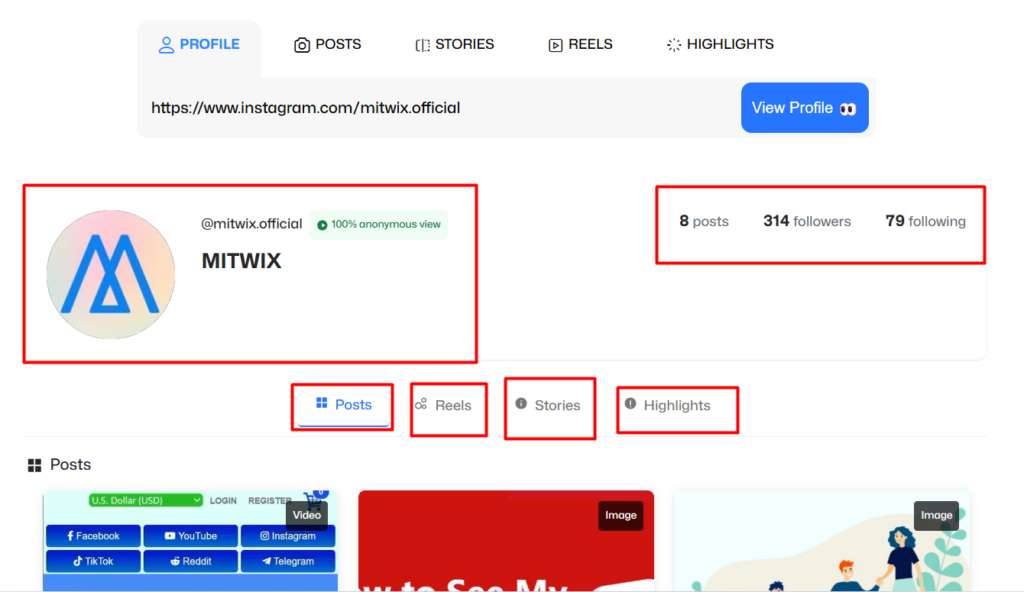
Step-by-Step Guide for Using Web Viewers
Start by opening your browser and heading to a trusted anonymous Instagram viewer site. Type the username you want to check into the search bar. Hit enter, and wait about 10-30 seconds for the page to load.
You’ll see a feed of photos, videos, and reels if the account is public. Scroll through like a normal profile, but no likes or comments are possible. Some tools even show highlights from old stories.
- Tip 1: Clear your browser cache after use to wipe any traces.
- Tip 2: Use incognito mode for extra privacy layers.
- Tip 3: If it fails, try another site Instagram blocks some often.
Before jumping in, skim the site’s privacy rules. They should say no data storage on their end. This keeps your session safe and quick.
Method 2: Leveraging Search Engine Caching and Indexing
Searching for Indexed Instagram Content via Google/Bing
Search engines like Google grab public Instagram pages and hold snapshots. Type “site:instagram.com [username]” to find direct hits. Add words like “posts” or “profile” for better results.
Bing works the same way, sometimes showing fresher caches. This method pulls old versions from before Instagram tightened rules. It’s free and needs no extra tools.
Over 70% of public content gets indexed, per web stats. You can uncover lost posts this way. Just refine your query if the first try misses.
Accessing Cached Posts and Profiles
Spot a result that matches? Look for the small arrow next to the URL and pick “Cached.” A stored page pops up, showing the profile as it was days or weeks ago. Images and captions load without a login prompt.
Not every post appears—only what’s been crawled. Videos might not play fully, but photos shine through. Refresh the search later for updates.
- Step 1: Enter the search operator precisely.
- Step 2: Scan results for the green cache icon.
- Step 3: Click and browse the snapshot version.
This trick feels like time travel for content. It beats login walls for quick peeks. Use it alongside other methods for fuller views.
Method 3: Exploring Alternative Aggregators and Syndication
Using Instagram Content on Other Platforms
Public Instagram posts often land on blogs or news sites. Influencers share links that embed full images without logins. Search for the username plus “interview” or “feature” to find these spots. For example, a celeb’s viral reel might appear in a CNN article with the full video playable. No Instagram visit needed—just the host page loads it. This syndication happens daily across the web. Tools like Pinterest repin Instagram pics too. Search there for visual boards linked back. It’s a natural way to see content spread out.
Browser Extensions and Developer Tools (Advanced Techniques)
Extensions like “Remove Paywalls” sometimes lift login overlays on social sites. Install from your browser store, then visit Instagram—the tool might strip the barrier. Results vary; Instagram fights back with updates.
For tech-savvy users, open Developer Tools with F12. Right-click a blurred image and inspect to grab the direct URL. Paste it into a new tab for a clean view.
These aren’t foolproof and could break rules. Use sparingly to avoid bans. Pair with basic methods for best outcomes.
- Pros: Quick for one-off views.
- Cons: May not work on mobiles; risks account flags if detected.
Navigating Limitations: What You Cannot View Anonymously
The Inaccessibility of Stories and Direct Messages (DMs)
Stories disappear after 24 hours, and Instagram guards them tight—no anonymous access. Even public ones prompt logins now. Tools rarely catch these fleeting bits. DMs stay private always; they’re for logged-in chats only. Hacking attempts are illegal and pointless here. Focus on permanent posts instead.
Why bother? Stories add fun, but they’re not worth the risk. Public feeds give plenty without them.
Security and Ethical Considerations for Anonymous Browsing
These tips work just for public content—never push into private zones. Crossing lines invites trouble, like legal issues or viruses. Stay ethical to respect creators’ wishes. Instagram tweaks security yearly, so methods fade. Experts say true anonymity demands caution, like VPNs. Don’t follow obsessively; it’s not built for that.
Balance privacy with respect. View, learn, move on. This keeps the web safe for all.
Conclusion: Mastering Anonymous Consumption of Public Content
You’ve got solid ways to view Instagram without an account now third-party viewers offer easy feeds, while search caches grab snapshots. Alternative platforms fill gaps with embedded shares. Stick to public stuff for low-risk peeks. Patience pays off, as these tricks demand trial and error. Instagram wants your login, so stay vigilant against updates. Try the web viewer first for quick wins.
Ready to browse? Pick a method, protect your setup, and dive in anonymously. You’ll enjoy the content without the commitment.